Settings
Settings
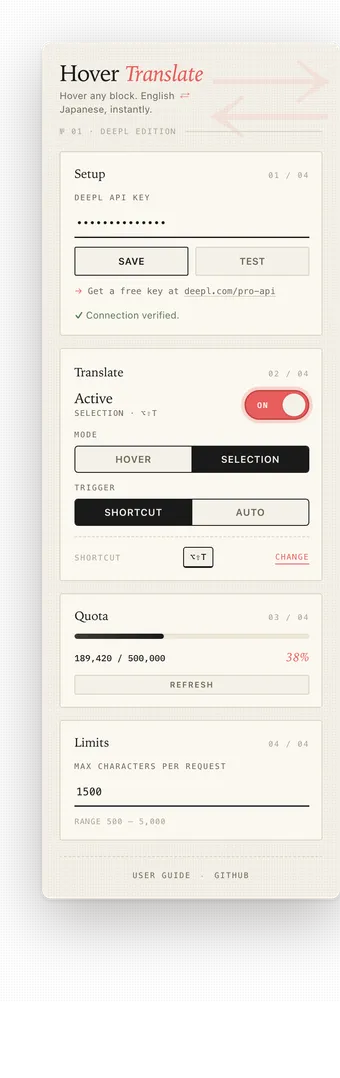
The popup UI is divided into three sections: Engine, Translate, and Limits. Settings are stored in chrome.storage.local under the hoverTranslateState key.
Engine
The Engine section reports Chrome built-in Translator API readiness.
- Ready for English ⇄ Japanese means Chrome already has the required language packs.
- Prepare language packs before first use means Chrome can download the packs, but the download must start from a user click.
- Prepare starts the English → Japanese and Japanese → English language pack setup.
- Chrome 138+ desktop required means the browser does not expose the Translator API.
Translate
The Translate section is the main control surface.
ON/OFF toggle
The coral pill toggle enables or disables the extension globally. When off, Hover Translate does nothing regardless of mode.
Mode switch
- Hover translates the nearest paragraph after a 300 ms debounce.
- Selection translates only the text you explicitly select.
Switching modes applies immediately and discards any in-flight translation from the previous mode.
Trigger switch
When Mode is Selection, choose how translation fires:
- Shortcut: press
Alt+Shift+Twhile text is selected. - Auto: translate automatically 300 ms after mouse release.
Shortcut row
The current shortcut binding is shown only in Selection + Shortcut mode. The Change link opens chrome://extensions/shortcuts.
Limits
The Limits section defines the maximum number of characters in a single translation.
- Max characters per request accepts values from 500 to 5000.
- The default value is 1500.
- This number is used for the
Text too longerror. - In Hover mode, this also caps how far up the DOM tree Hover Translate looks for a containing block.
Stored state
Hover Translate keeps the following fields inside hoverTranslateState:
{ "enabled": true, "mode": "hover", "selectionTrigger": "shortcut", "maxChars": 1500}